Danssport Vlaanderen integration
Automatically insure members with Danssport Vlaanderen.
Last updated 7 days ago
Automatically insure members with Danssport Vlaanderen

Send your members to Danssport Vlaanderen in three steps.
1. Arrange your federation membership
The integration works only if your club is affiliated with Danssport Vlaanderen.
To arrange affiliation, apply using this link: https://clubportaal.danssportvlaanderen.be/word-een-club
Once your affiliation is complete, a “Danssport Vl.” menu appears in your Ledenbeheer account.
2. Activate the integration in Ledenbeheer
Go to Settings > Integrations to enable the integration.
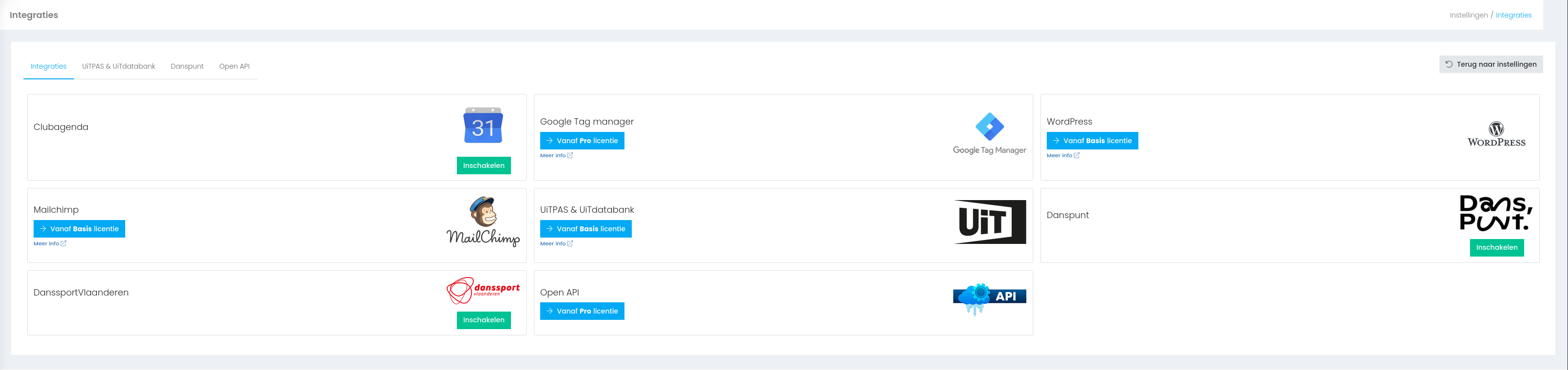
After enabling it, connect your Danssport Vlaanderen account to Ledenbeheer by entering a Client ID and Secret ID. You can find these in the Danssport Vlaanderen portal.
Sign in at https://clubportaal.danssportvlaanderen.be/
Click “My club”
Click “API details”
You will find the Client ID and Secret ID there. If you cannot find them, contact stijn@danssportvlaanderen.be.
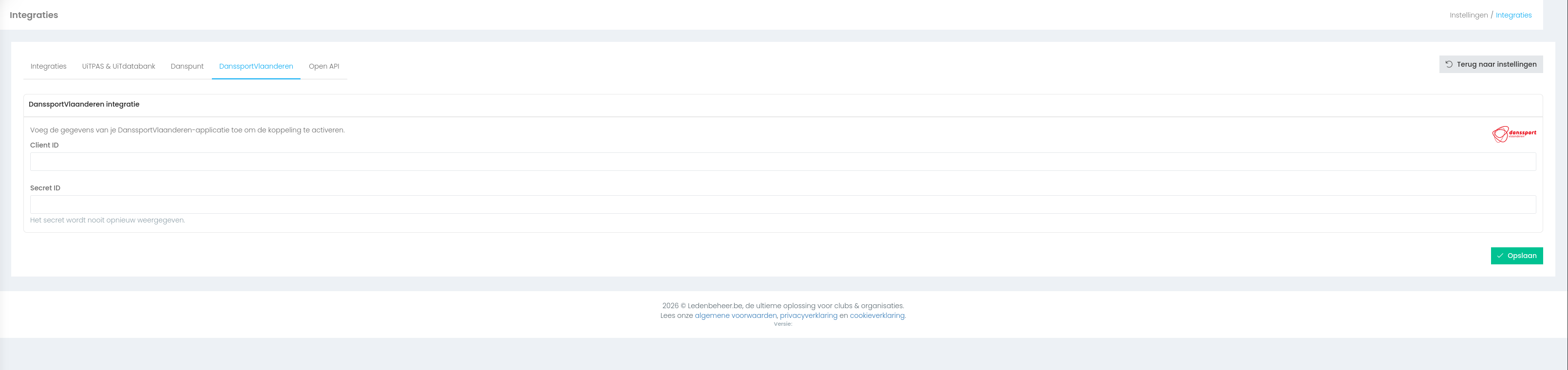
3. Select the dance styles your club offers
On the Danssport Vlaanderen platform, go to My club > Club information and select the dance styles your club offers. They are imported automatically into Ledenbeheer so you can choose them for each course.
2. Set the rate
Under Danssport Vl., click Rate.
From the 2026–2027 season, Danssport Vlaanderen charges €10 per affiliated member, regardless of age.
You can pass the Danssport Vlaanderen membership fee on to the customer. It is charged once per sports year during registration.
If the fee is included in your course price, set its price to €0.
If you want to insure all members automatically, remember to make membership mandatory!
On this page, you can set the Danssport Vlaanderen membership fee for each age group.
You can rename the rate, for example to “Insurance”, by clicking the icon beside “Standard rate”.
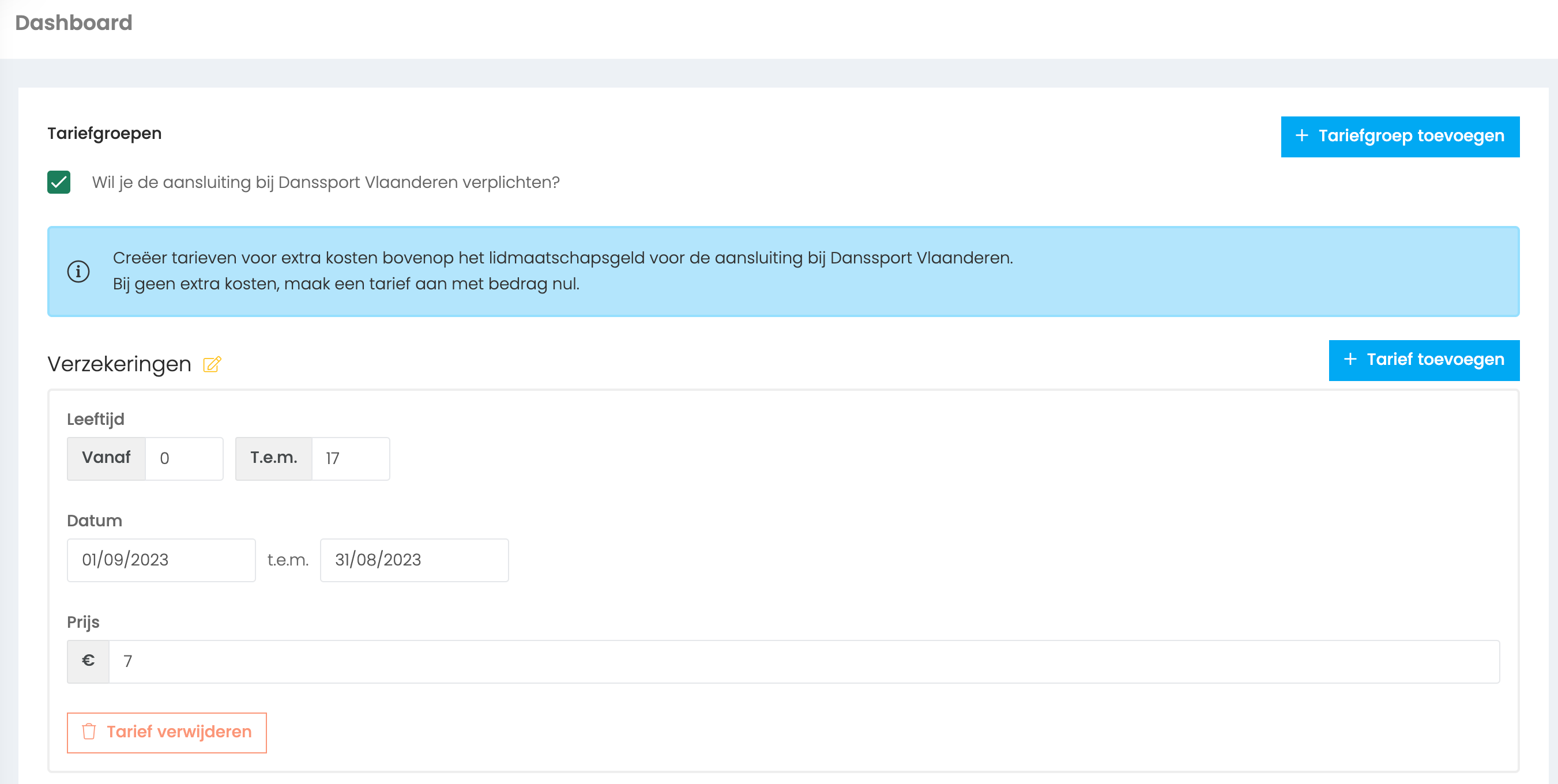
Create multiple rates and decide for each activity whether members must pay for their affiliation.
Dance schools often charge insurance on top of the course fee for weekly classes but include it in the price of camps.
You can therefore have a paid rate and a free rate. Your club chooses which rate applies to each activity.
4. Choose which activities require insurance
Every activity has a Danssport Vlaanderen section on the Settings tab.
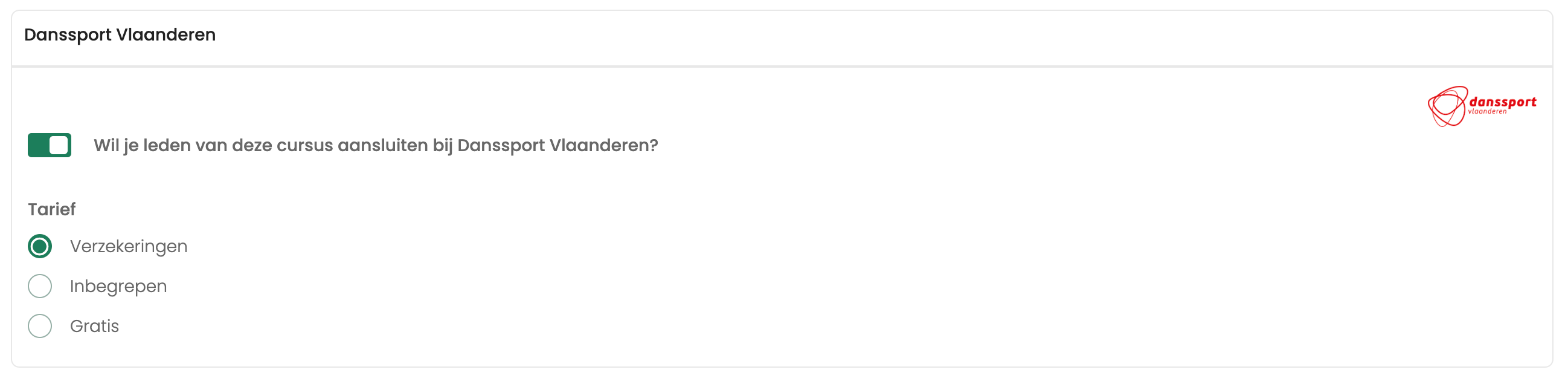
Select the option to send activity members to Danssport Vlaanderen for insurance. Choose the rate for registering members (see above). All members of this course will then be affiliated automatically.
Besides a rate, you must specify these members’ statuses.
Enable this option before registration opens. The required Danssport Vlaanderen questions are then added to your course automatically. Otherwise, Danssport Vlaanderen may lack the details needed to insure members.
You can enable the setting for all activities at once under Course offerings > Bulk edit.
Who is insured automatically?
All members registered for activities with the Danssport Vlaanderen integration enabled are eligible. Their cost note must be paid before they are sent to Danssport Vlaanderen (DSV).
Find the full list of affiliated members under Danssport Vl. > Registered members.
Insure members manually with Danssport Vlaanderen through Ledenbeheer
To insure a member manually, first create a dedicated course under Danssport Vl. > Rate. There is a button there to create it for you.

Then register the member:
Course offerings > Registrations > Add registration
As with a standard registration, click “Add registration”. At the bottom of the right-hand column, choose “Danssport Vlaanderen membership” and follow the steps. Once the cost note is paid, these members are sent to the federation automatically.
Insure teachers with Danssport Vlaanderen
Teachers can only be insured through the Danssport Vlaanderen portal: https://danssportvlaanderen.be/voor-clubs/administratie/ledenprogramma
Where can I find my members’ membership cards?
Membership cards are available in the Danssport Vlaanderen portal, not in Ledenbeheer.
Who is not insured automatically?
Members with incomplete details
Members with incomplete details
Under Danssport Vl., the error list shows members with missing details. They are not affiliated until the information is completed.
Members who have not yet paid
Members who have not yet paid
Only members whose cost note for that class has been paid in full or in part are sent. They are sent as soon as they make a payment.
Session pass users
Session pass users
Buying a session pass is not yet linked to Danssport Vlaanderen. Insure session pass users manually.
Course organisers
Course organisers
Course organisers, teachers and trainers are not sent automatically unless they are also registered for a course.
Administrators
Administrators
An administrator who is not registered for a course is not sent to Danssport Vlaanderen.
Frequently asked questions
Which participant details are shared with Danssport Vlaanderen (GDPR)?
Which participant details are shared with Danssport Vlaanderen (GDPR)?
What if members withdraw?
What if members withdraw?
Members who have paid are sent to Danssport Vlaanderen. If they later withdraw from classes, they remain insured. When removing a member, you may choose to cancel their Danssport Vlaanderen affiliation. That request goes to the federation, which decides whether the membership fee will be refunded.
Can I import members for Danssport Vlaanderen affiliation?
Can I import members for Danssport Vlaanderen affiliation?
Yes, but you must do this in the Danssport Vlaanderen portal.
Why are my members not being sent?
Why are my members not being sent?
the club must be affiliated with DSV
the DSV integration must be enabled on the Settings tab of the relevant course, with all fields completed correctly
the registration must have a payment
there must be no errors in required fields (Danssport Vl. > Error list)
Why can’t I see any members in the Danssport Vlaanderen menu yet?
Why can’t I see any members in the Danssport Vlaanderen menu yet?
Still need help? Ask the team