Health insurance and tax certificates
Last updated 7 days ago
Certificates are available from the Basic licence.
Manage the required certificate settings under "Settings > Certificates", on the "Settings" tab.
Health insurance certificates
Organisations offering sports classes can provide these certificates to members. Members can submit them to their health insurance fund for reimbursement. Ledenbeheer generates the certificates automatically.
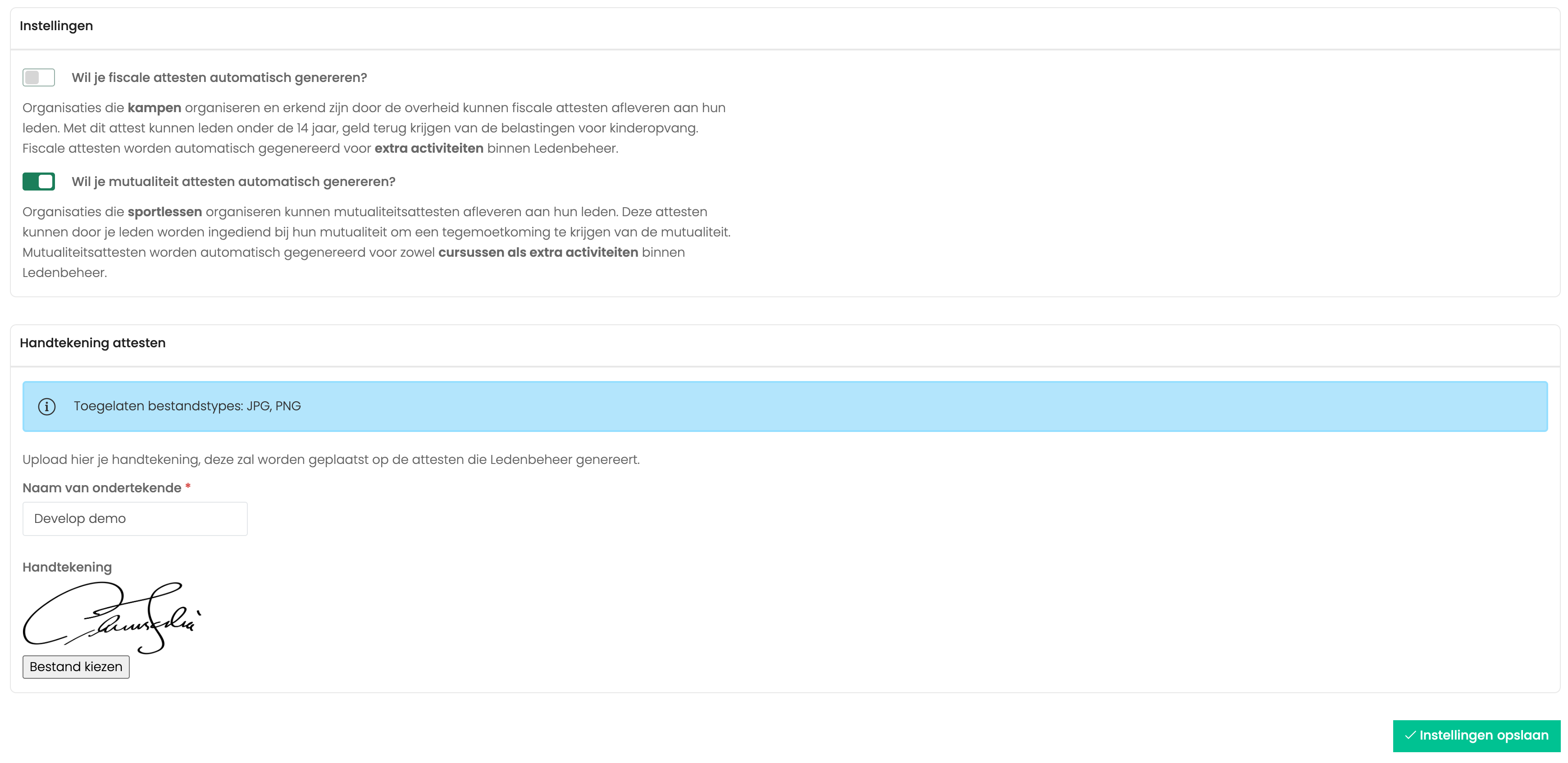
You can sign the certificates automatically by uploading your signature:
Enter the name of the person responsible for the club.
Sign a piece of paper, scan it and upload the file to Ledenbeheer.
Your signature is added to the health insurance form automatically.
Uploaded signatures are resized automatically but are not corrected. If the image background is not pure white, it may show on the certificates.
Frequently asked questions about health insurance certificates
Can I download health insurance certificates as an administrator?
Can I download health insurance certificates as an administrator?
Open a member's profile by clicking their name. Then go to the Registrations tab and click the three dots beside a registration. Select Download certificate.
Are health insurance certificates available for session passes too?
Are health insurance certificates available for session passes too?
Yes. Members who buy a session pass receive a health insurance certificate after paying for it.
Tax certificates
Non-commercial organisations that run camps and are recognised by the government can provide tax certificates to their members. These certificates allow members to claim a childcare tax reduction for children under 14. Ledenbeheer automatically generates tax certificates for camps.
The maximum deductible amount per camp day and child was increased. For income year 2025, deductible expenses are limited to €16.90 per day and child.
General settings
Enter the required information under Settings > Certificates.
Your organisation's name.
Select one of the four options to show how your organisation is recognised.
Enter the name, VAT number and address of the certifying body, usually your federation.
After saving this information, choose which activities should generate certificates.
Change the sequence number
If you have just moved to Ledenbeheer or have manually issued certificates with existing sequence numbers, you can have Ledenbeheer continue that numbering.
Use attendance records
By default, certificates cover the full camp period. However, you may issue certificates only for days when the child actually attended. Enable this setting to use attendance records.
Once enabled, the system automatically creates certificates based on attendance recorded in Ledenbeheer.
Settings for each activity
Open the activity's "Settings" tab and select the option to generate certificates for it.

Ledenbeheer will then ask members for the following details when they register. You do not need to create these questions yourself:
Child's first name and surname.
Parent's first name and surname.
Child's Belgian national register number.
Parent's Belgian national register number.
Child's address.
Parent's address.
Members can download their certificates under "Certificates" in their profiles. They will also find their health insurance certificates there.
To report all eligible members to the tax authority, submit an XML file through Belcotax-on-web. Ledenbeheer creates this file automatically. Find it under "Settings" > "Certificates", at the bottom of the "Manage" tab.
You must submit this XML file to the government yourself through Belcotax-on-web.
Tax certificates for people with a severe disability
A ‘severe disability’ refers to children entitled to increased child benefit on the basis of:
at least 15 points on the medical and social scale for child benefit; or
more than 80% physical or mental disability, with 7 to 9 points for degree of independence.
For each activity, you can specify whether it is intended for people with a severe disability. Certificates are then created for registered members up to age 21.
All required fields must be completed before a certificate can be downloaded. Members can supply missing details when downloading theirs. Administrators can also download the list of missing details from the "Errors" tab.
How do I submit certificates to the tax authority?
We have written a blog post about this: Read the blog post on submitting tax certificates
Frequently asked questions
Can I download certificates for members as an administrator?
Can I download certificates for members as an administrator?
Yes. Find tax certificates under Settings > Certificates.
What if I enable tax certificates now? Can members still download them, and how do they add missing details?
What if I enable tax certificates now? Can members still download them, and how do they add missing details?
Certificates are generated retroactively, so you can enable the setting later. Before members download a certificate, they will be prompted to add any missing details.
Why can't I see all registered members under Manage certificates?
Why can't I see all registered members under Manage certificates?
Only registered members under 14 appear here.
The list is also grouped by payment year. Use the year filter in the top right.
Can I change details on the certificates?
Can I change details on the certificates?
Yes. Under Settings > Certificates, choose "Change details" beside a certificate. You can also change the person claiming the child as a dependant or enter shared custody for separated parents.
Do parents object to providing a national register number?
Do parents object to providing a national register number?
There is a legal reason to ask for it. National register numbers are stored fully encrypted, so the club cannot view this information.
I get an error when entering a national register number
I get an error when entering a national register number
Ledenbeheer checks a national register number against the date of birth in the member's profile. They must match.
A parent says the certificate is not visible in their account
A parent says the certificate is not visible in their account
The parent must sign in with the same email address used for registration. The certificate is created only if the child was under 14 when the camp began.
When is a tax certificate available to members?
When is a tax certificate available to members?
After the activity has ended.
Once the full amount has been paid.
If the young person is under 14.
Who can receive a tax certificate?
Who can receive a tax certificate?
Anyone with a valid national register number who is under 14 when the camp ends.
Can I receive a tax certificate if I pay in instalments?
Can I receive a tax certificate if I pay in instalments?
Yes, but the full amount must be paid before you can download the certificate.
I paid for my camp in the previous calendar year. Will I still receive a certificate?
I paid for my camp in the previous calendar year. Will I still receive a certificate?
Yes, but the certificate must be included in the year of payment.
Camp expenses qualify for the tax reduction only for the year in which they were actually paid.
The camp must also have taken place. A certificate can therefore be issued only after the camp ends.
Example
A sports camp is paid for in full in December 2021. It takes place from 3 to 10 July 2022. The certificate can be issued only after the camp ends.
If the person liable for the costs did not receive the certificate in time to include the childcare expenses in their tax return, they can ask the tax office for a correction once they receive it.
The childcare provider can still submit the information electronically through Belcotax-on-web.
What happens if a camp is cancelled?
What happens if a camp is cancelled?
A camp has already been paid for, but is cancelled. The payment is later used for another camp that takes place. How should the certificate be issued?
Ledenbeheer creates it automatically only after the later activity takes place.
Example:
A camp is paid for in full in December 2021. It was due to take place in July 2022 but is cancelled because of bad weather. The amount is kept in an electronic wallet for a later camp.
The camp takes place in April 2023 and the wallet balance is used to pay for it. If all conditions are met, including the child's age at the time of the camp, the certificate may be issued for 2023.
When must my organisation submit the XML file to the government?
When must my organisation submit the XML file to the government?
The data must be sent before 1 March of the year after the calendar year covered by the certificates.
Can details be changed after submission to the government?
Can details be changed after submission to the government?
Yes. A submission can be amended even after the deadline, until 30 September of the third year after the year of the expenses.
Can tax certificates be used for weekly classes?
Can tax certificates be used for weekly classes?
Sports club and youth association membership fees are excluded from childcare costs. Activities that are part of the club's normal operation and covered by the membership fee do not count as childcare.
Examples of normal club activities include:
training sessions;
tournaments;
the usual Saturday and Sunday activities of a youth group;
practice sessions;
performances; and
other similar activities.
The childcare tax reduction is not intended to subsidise learning a sport or practising it; it covers childcare activities. Extra courses billed separately on top of membership fees therefore do not qualify.
Can a member change their national register number?
Can a member change their national register number?
Yes, in their profile. Existing certificates will not change unless you download them again.
Why is the amount on my certificate €0?
Why is the amount on my certificate €0?
The certificate uses the amount paid on the relevant cost note. If a full discount reduces that payment to zero, the certificate shows €0.
Some members have not completed all their details. How do I ask them to do so?
Some members have not completed all their details. How do I ask them to do so?
Open the "Errors" tab under "Settings > Certificates".
Missing details are marked with a red exclamation mark. You can add them yourself from the three-dot menu.
Or let members do it. Click "Send email to complete details" at the bottom of the page. This emails all parents whose details are incomplete. It links to their certificates and tells them which email address to use to sign in.
When members download a certificate, they are prompted to provide the missing details.
Here is the email your customers receive:
Dear [name],
Some details are missing for the tax certificate for [user name]'s registration for the camp "[title]" with [organisation].
Please use the link below to sign in with the email address used for registration ([email address]).
You can download the certificate there and provide the details needed for the tax return.
Link: https://app.ledenbeheer.be/attesten
Thank you for your help.
[Organisation name]
Someone entered an incorrect national register number. What can I do?
Someone entered an incorrect national register number. What can I do?
We check the first six digits against the date of birth, but mistakes in the last five digits may still occur. We cannot verify them; the government does and immediately reports an error if the number is invalid.
Contact the person and ask for the correct number. If they do not reply, you can remove the incorrect number and submit the certificate with that field blank.
Go to Settings > Certificates, find the certificate, click the three dots on the right and select "Ignore national register number".
Can separated parents each receive a certificate?
Can separated parents each receive a certificate?
After registration, the club can mark the parents as separated and enter the amount each paid. Each then receives a tax certificate for their share in their own account.
Set this under Settings > Certificates. Find the certificate and select shared custody from its menu.
More questions?
See the government's FAQ too: Government FAQ on tax certificates
Still need help? Ask the team